How to Read DMARC Reports (and What to Do With Them)
A DMARC aggregate report is a daily XML file that mailbox providers send you, listing everyone who sent email as your domain and whether each sender passed authentication. Every major provider that supports DMARC — Google, Microsoft, Yahoo and a long tail of smaller receivers — generates and sends these reports on a fixed schedule, following the same public specification: RFC 7489, the document that defines DMARC itself. No vendor lock-in, no proprietary format; the report from Gmail and the report from Yahoo describe your traffic in the same fields.
Here's what those fields actually say. If you got a report from Gmail this morning, it means: in the last 24 hours, these senders used these IP addresses to send this many emails to Gmail recipients under your domain's name. For each sender it tells you whether their own DNS authentication checked out (SPF and DKIM results), whether that authentication aligned with your domain, and — when it didn't — what Gmail did with the mail: followed your published DMARC policy and junked or rejected it, or, while you're still on monitoring mode, made its own call.
So read the report for what it is: an ISP reconciling accounts with you. "Yesterday, this is what arrived claiming to be you — does it match what you actually sent?" When it matches, you close the book. When it doesn't, someone is either a tool your team forgot — or a stranger running phishing campaigns under your brand, and the report is the only place you'll ever see it. Almost nobody opens these files because raw XML reads like a tax form. That's exactly why the surprises in them survive for years.
This walkthrough uses a real report. Reading any DMARC report comes down to three questions: who is sending as your domain, did anything pass authentication, and did it pass aligned with your domain? By the end you'll know which fields matter, which three patterns to hunt for, and what to do about each one.
First: are reports actually arriving?
Getting reports is one DNS edit: add an rua= tag to your DMARC record, pointing at whatever mailbox you want them sent to. A complete monitored record looks like this:
rua=— where the reports land. Use a mailbox you actually check; volume scales with how much you send.adkim=r; aspf=r;— relaxed alignment. The default, and what you want for almost any setup.fo=1— report when either SPF or DKIM fails, not only when both do
One myth to kill early: plenty of checking tools — and plenty of AI assistants — will tell you the rua= address has to be a mailbox on your own domain. It doesn't. I use an ordinary personal Gmail address for this and reports arrive exactly as they should. (The RFC does define a DNS verification record for third-party report addresses; the major receivers don't insist on it.)
No DMARC record at all yet? Do the SPF, DKIM and DMARC setup first — it takes an afternoon — and come back here when the reports start landing.
Timing: reports can start arriving the same evening you publish the record — each receiver sends roughly one a day, covering the previous day. One caveat that trips people up: a receiver only reports on days you actually sent mail to it. No Gmail recipients yesterday, no Gmail report today. And how much mail does it take to trigger a report? We tested this directly: one message is enough. A single email to a single Gmail address, and the report is in the mailbox the next morning.
Stop and consider what that means, by the way: every major receiver on Earth generates a per-domain report for every domain that asks, every single day, for free. The ecosystem runs on more shared infrastructure than most senders realize. I read Gmail's first — when someone comes to me with an open-rate problem, Gmail is usually where it lives.
Set up your rua= tag, and before long your inbox will look like this:
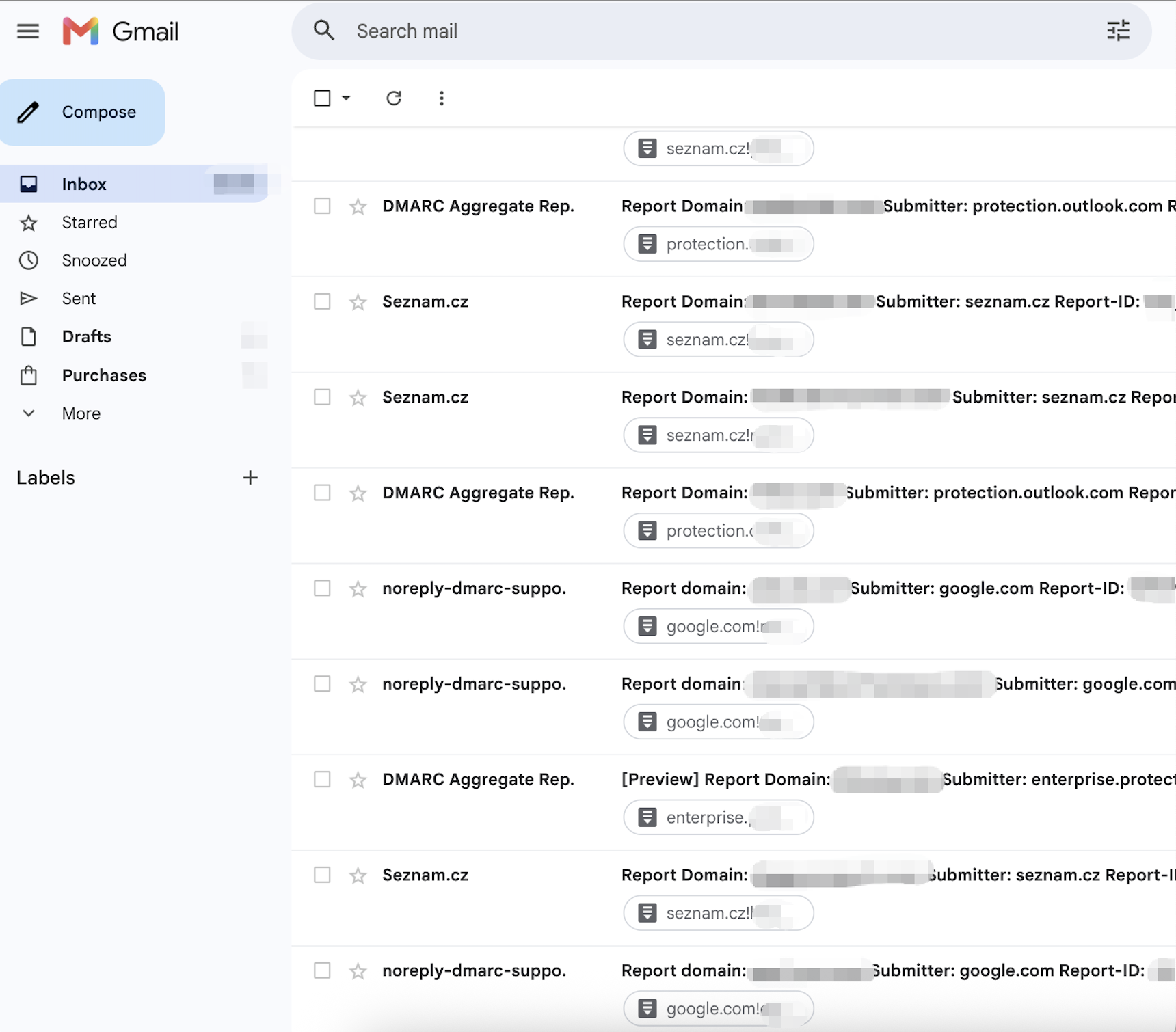
How do you read a DMARC XML report?
Before the fields, a practical question: how do you even open one of these? The attachment is a zip holding a single XML file. Any text editor or Notepad will open it; Excel will too. I usually reach for Excel — it flattens the nested tags into rows you can scan like a spreadsheet. If you'd rather not touch raw XML at all, dedicated DMARC XML readers — dmarcian, EasyDMARC and similar parsers — turn the files into dashboards, and an AI assistant will summarize a pasted report surprisingly well. Read a few by hand first, though; the tools make more sense once you know what the fields mean.

Even the filename is already telling you things. google.com!ohmysend.com!1779235200!1779321599.xml reads as who reported · about which domain · covering what window — the two numbers are Unix timestamps, here May 20, 2026, 00:00 to 23:59 UTC.
A real DMARC report example
Here is a report itself — real and unedited, from my own domain:
<?xml version="1.0" encoding="UTF-8" ?>
<feedback>
  <version>1.0</version>
  <report_metadata>
    <org_name>google.com</org_name>
    <email>noreply-dmarc-support@google.com</email>
    <extra_contact_info>https://support.google.com/a/answer/2466580</extra_contact_info>
    <report_id>14518727316240955569</report_id>
    <date_range>
      <begin>1779235200</begin>
      <end>1779321599</end>
    </date_range>
  </report_metadata>
  <policy_published>
    <domain>ohmysend.com</domain>
    <adkim>r</adkim>
    <aspf>r</aspf>
    <p>reject</p>
    <sp>reject</sp>
    <pct>100</pct>
    <np>reject</np>
  </policy_published>
  <record>
    <row>
      <source_ip>43.154.54.12</source_ip>
      <count>1</count>
      <policy_evaluated>
        <disposition>none</disposition>
        <dkim>pass</dkim>
        <spf>pass</spf>
      </policy_evaluated>
    </row>
    <identifiers>
      <header_from>ohmysend.com</header_from>
    </identifiers>
    <auth_results>
      <dkim>
        <domain>ohmysend.com</domain>
        <result>pass</result>
        <selector>lbnd2604</selector>
      </dkim>
      <spf>
        <domain>ohmysend.com</domain>
        <result>pass</result>
      </spf>
    </auth_results>
  </record>
  <record>
    <row>
      <source_ip>18.169.211.239</source_ip>
      <count>1</count>
      <policy_evaluated>
        <disposition>none</disposition>
        <dkim>pass</dkim>
        <spf>pass</spf>
      </policy_evaluated>
    </row>
    <identifiers>
      <header_from>ohmysend.com</header_from>
    </identifiers>
    <auth_results>
      <dkim>
        <domain>ohmysend.com</domain>
        <result>pass</result>
        <selector>lbnd2604</selector>
      </dkim>
      <spf>
        <domain>ohmysend.com</domain>
        <result>pass</result>
      </spf>
    </auth_results>
  </record>
</feedback>
What every field means, top to bottom:
| Field | What it tells you |
|---|---|
| org_name / email | Who compiled this report — here, Google |
| report_id | Unique ID for the report; only useful for deduplication |
| date_range | The window covered, as Unix timestamps |
| policy_published | Your DMARC policy as the receiver saw it: alignment modes (r = relaxed), p/sp (policy for the domain and its subdomains), pct (the share of mail the policy applies to). Glance at this once in a while — it's the receiver reflecting your own DNS back at you. Mine reads p=reject; we'll get to policies in Step 3. |
| source_ip | The IP the mail came from |
| count | Messages from that IP inside the window — here, 1 |
| policy_evaluated | The verdict that matters: did SPF/DKIM pass aligned with your domain, and what the receiver did about it (disposition) |
| header_from | The From domain your recipients saw |
| auth_results | The raw checks: which domain signed DKIM (and with which selector), which domain SPF authorized, whether each verified |
How does DMARC actually reach a verdict?
The last four fields aren't a list — they're a chain. Read them in order and you're watching DMARC think:
Step 1 — the raw SPF check (auth_results → spf): which domain did SPF vouch for, and did this IP pass it? Two values: domain and result. Watch out for what domain means here — it's the return-path domain (where bounces go), not necessarily your From domain. In my report: ohmysend.com, pass.
Step 2 — the raw DKIM check (auth_results → dkim): which domain signed the message, under which selector, and did the signature verify? The selector is just the key's label — receivers use it to fetch the public key from DNS (mine is lbnd2604, so the key lives at lbnd2604._domainkey.ohmysend.com). Mine: signed by ohmysend.com, pass.
Step 3 — the alignment check (policy_evaluated → dkim / spf): now DMARC compares. Does the domain that passed SPF match header_from? Does the domain that signed DKIM match header_from? These two lines are the alignment verdicts — the entire point of DMARC. Mine say pass/pass, because every domain in the chain was ohmysend.com.
Step 4 — the action (disposition): what the receiver finally did, driven by your published policy. One nuance that trips up beginners: none here does not mean "your policy is p=none" — my policy is p=reject, and the disposition is still none. It means nothing failed, so there was nothing to enforce. You only see quarantine or reject when DMARC fails outright — and DMARC only fails when both alignment verdicts fail.
Keep that chain in mind — raw check, raw check, alignment, action. Everything later in this article is just these four steps going right or going wrong.
Now the three questions I ask of every record, applied to this one:
- Who is this? Two IPs, one message each.
auth_resultsshows both messages DKIM-signed asohmysend.comunder the selectorlbnd2604— my own sending setup. No strangers at the table. - Did anything pass raw? Everything did: DKIM pass, SPF pass, on both records.
- Did alignment pass? Yes — the signing domain is the From domain.
policy_evaluatedsays pass/pass, and with nothing failing,dispositionisnone: Gmail handled the mail normally.
Two things to notice before we move on. The count: 1. This report exists because of single messages — the "one email is enough" point from the previous section, caught in the wild. And the overall shape: two records, all green, nothing to fix. This is what boring looks like, and boring is the goal.
Now the interesting kind of record — trimmed, from a client audit, details changed:
<record>
  <row>
    <source_ip>203.0.113.10</source_ip>
    <count>4821</count>
    <policy_evaluated>
      <disposition>none</disposition>
      <dkim>fail</dkim>
      <spf>pass</spf>
    </policy_evaluated>
  </row>
  <identifiers>
    <header_from>yourdomain.com</header_from>
  </identifiers>
  <auth_results>
    <dkim>
      <domain>esp-shared-domain.com</domain>
      <result>pass</result>
    </dkim>
    <spf>
      <domain>yourdomain.com</domain>
      <result>pass</result>
    </spf>
  </auth_results>
</record>
Run the same three questions:
- Who is this? One IP sent 4,821 emails with the client's From domain, DKIM-signed by
esp-shared-domain.com. Their email service provider — 4,821 a day is marketing-campaign volume. - Did anything pass raw? In
auth_results: DKIM pass (the ESP's signature is cryptographically valid), SPF pass. Looks healthy. - Did alignment pass? Now the subtle part.
policy_evaluatedsays DKIM fail — even thoughauth_resultssays DKIM pass.
That third point is not a contradiction, and it's the one thing most "how to read DMARC" guides skip. auth_results reports whether each check verified at all; policy_evaluated reports whether it verified for the domain in your From line. DMARC alignment means the domain that passed a check matches the domain your recipients actually see. The signature here belongs to esp-shared-domain.com — valid, but not aligned. DMARC survives only because SPF happened to align. One DNS change at the ESP and they're failing.
A sender with every raw result green can still be one misconfiguration from DMARC failure. This is where the real findings live.
Understanding DMARC reports: the three patterns worth hunting for
1. Your own ESP, failing alignment
The example above isn't exotic — it's the single most common gap I find in audits. The marketing platform signs DKIM with its own shared domain, or bounces through its own shared return-path, and the green checkmarks in its dashboard never mention that neither domain is yours. The fix is boring and documented everywhere: configure custom DKIM signing on your domain, and a custom bounce domain so the return-path aligns too. (The full walkthrough is here.) What's strange is how many seven-figure senders run for years without doing it.
2. Shadow senders
The #1 finding in my diagnostics is a sender the team forgot existed: Shopify sending order confirmations, Zendesk or Intercom sending support replies, a review platform, a dead integration nobody turned off. All sending as your domain, all failing alignment, all quietly teaching Gmail that mail from you is loosely verified.
In the reports they show up as records where:
header_fromis your domain, but- the
auth_resultsdomains are services you don't recognize — or recognize with a sinking feeling, and policy_evaluatedshowsfail/fail.
When both policy results fail and you don't own the source, it's either a forgotten tool or actual spoofing. The report can't tell you which; the source IP's owner usually can. My personal record: a logistics platform a client had stopped using two years earlier. Still sending. Still failing.
3. Forwarding that breaks SPF
Some failures are not failures. When a recipient forwards your email, or it passes through a mailing list, the message keeps your From header but arrives from a server your SPF record never authorized — so SPF fails at the next hop. DKIM usually survives the trip, which is exactly why DKIM alignment matters for anything people forward: newsletters, receipts, B2B mail that crosses offices.
You can't fix forwarding, and you don't need to. You need to recognize it — a legitimate source failing SPF-only, at low volume — so you don't burn a weekend chasing a phantom. One observation from my own reports: this pattern shows up disproportionately on the Microsoft side. Outlook and Microsoft 365 mailboxes get forwarded a lot, and Microsoft's forwarding almost always breaks SPF on the way.
What should you actually do with DMARC reports?
Reading reports is a means. Here's the working loop I run:
Step 1 — Sort every source into three buckets. Mine and should pass (your ESP, your transactional platform), mine but forgotten (the shadow senders), and not mine (everything else). Most reports shrink to a manageable list the moment you do this.
Step 2 — Fix by bucket.
- ESP failing DKIM alignment → turn on custom DKIM / branded sending domain
- ESP failing SPF alignment → set up a custom bounce domain so the return-path aligns too
- Platform mail failing (Shopify, Zendesk, the helpdesk, the review tool) → configure that platform's custom sending domain, or consciously accept the gap and write it down
- A tool you forgot → fix its signing or kill it
- A source you don't own, failing both → someone's spoofing you; you can't fix their config, but Step 3 is how you make their mail worthless
Step 3 — Tighten your DMARC policy. Faster than the internet tells you. p=none is monitoring mode. It's where you start; it's not where you stay, because a policy that enforces nothing stops nothing. Most of the industry never leaves it: in a check of 34 top-traffic brands' live records, 17% still sat on p=none — including some very large retail names.
How long should you monitor? Far less than most guides say. Plenty of tools — and plenty of AI assistants — will tell you to ramp slowly with pct=: quarantine 10% of failing mail, then 25%, then 50, watching each step for weeks. I've never needed the ramp. The cadence I actually run:
- Day 1 — publish the
rua=record. - Day 2 — read the first reports and triage every source (Step 1's buckets). A legitimate sender failing? Nine times out of ten it's a platform that was never authenticated — you fix its signing, and it goes green.
- Day 3 — go straight to
p=reject.
People flinch at skipping quarantine. Don't. The two policies differ only in where unauthorized mail dies — the spam folder, or the doorstep. If something out there is sending as your domain and it isn't yours, reject is exactly what you want: the receiver discards the message outright instead of filing it anywhere. The only thing a fast reject can hurt is a legitimate sender you forgot — and that's what Day 2 is for.
Step 4 — Re-read after every change. New ESP, new tool, DNS migration — re-read your reports. DMARC reports are how you catch the change that broke something this week, instead of wondering why open rates slid next month.
And if the XML volume is past what you'll read by hand: paste a report into an AI assistant and ask it to list each source_ip with count, auth domains, and policy results, flagging anything failing both. It handles the chore well. Dashboards like dmarcian or EasyDMARC make sense once you're past a few reports a day — but neither is a substitute for knowing what the fields mean.
And if you'd rather have a person look at your setup before you touch anything: checking SPF, DKIM, DMARC and alignment by hand is exactly what I do in the free domain check — email me your domain, you get a written assessment within 48 hours.
What if reports are all green but open rates are still dropping?
Then your problem isn't authentication. Reports answer one question — is mail claiming to be from my domain actually authorized? That's identity. Whether Gmail then puts you in the inbox depends on your domain reputation: a separate score, built from complaint rates and engagement history, that no DMARC report will ever show you. Clean authentication with a bad reputation still lands you in spam. If that's where you are, the next read is how Gmail scores your domain. And if what you're actually staring at is a sliding open rate, run it through the step-by-step diagnostic workflow first — it tells you which layer broke.
FAQ
Which DMARC policy should I start with — none, quarantine, or reject?+
p=none with a rua= address so reports start flowing — that's monitoring mode, not a destination. Read the first reports, fix every legitimate sender that's failing alignment, then go straight to p=reject. The whole path usually takes three days; the weeks-long pct= ramp most tools recommend is optional. quarantine and reject differ only in where unauthorized mail dies — the spam folder or the doorstep — and reject is what makes spoofed mail worthless.How often are DMARC reports sent?+
What's the difference between rua and ruf?+
rua delivers aggregate reports — the daily XML summaries this article is about. ruf delivers forensic (failure) reports: near-real-time copies of individual failing messages. Almost no major receiver sends ruf anymore — Gmail never did — so rua is the one that matters.How do I open a DMARC XML file?+
source_ip with its count, auth domains and policy results, or use a DMARC XML reader like dmarcian or EasyDMARC once you're past a few reports a day.Do I need to read every report?+
Can I just ignore DMARC reports?+
Is a passing DMARC report the same as good deliverability?+
Want your own domain checked first?
SPF, DKIM, DMARC and alignment — checked by hand, by me, not a script. Free, by email, within 48 hours.
Get a free domain check →Discuss
What was your weirdest shadow-sender discovery? Mine was a logistics platform a client had stopped using two years earlier — still sending, still failing. Yours: ohmysendcom@gmail.com. I read everything.
DMARC parsing is part of every diagnostic I run. Here's how that works.